


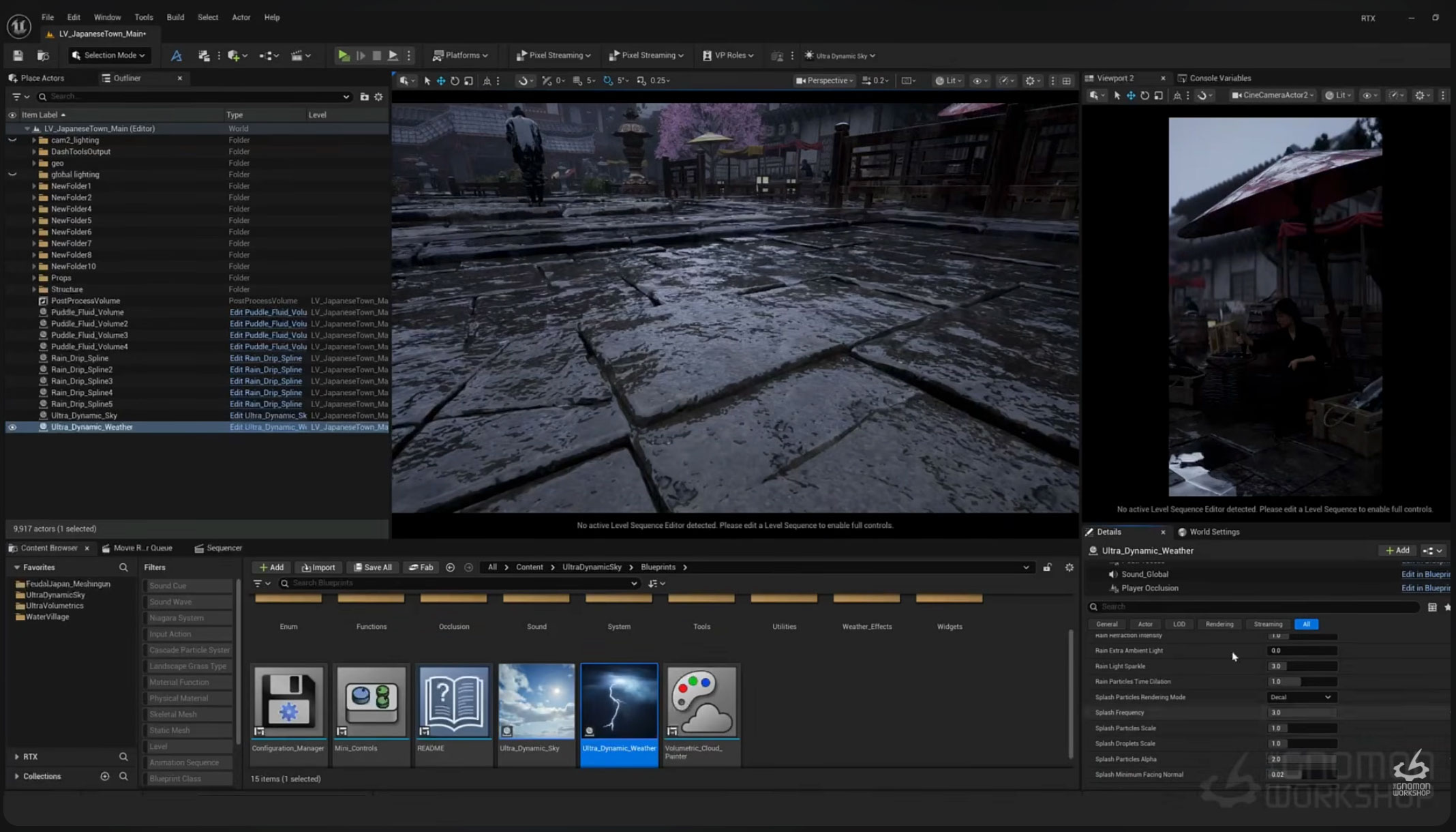

Today we are sharing a really interesting free tutorial on 3DArt, released by The Gnomon Workshop.
If you are working on a rainy environment in Unreal Engine 5, don’t miss
“Lighting Realistic Rainy Weather in Unreal Engine 5”, a workshop created by
Ted Mebratu, Senior Lighting Artist at Lightspeed LA, who showcases a professional workflow in just 30 minutes for creating atmospheric, realistic, and fully art-directable rainy scenes.
Lighting Realistic Rainy Weather in Unreal Engine 5: Lighting Workflow with Ted Mebratu
In just half an hour, this workshop condenses a complete professional Unreal Engine 5 lighting workflow: from building the global atmosphere to lighting the character, all the way through the material details that make a rainy scene feel realistic and cinematic.
It is the perfect content for artists who want to move beyond basic rain particle effects and learn how to create believable weather environments using the same approach as a professional Unreal Engine lighting artist.
The tutorial, available for free on YouTube, is aimed at intermediate and advanced 3D artists who already understand the basics of Unreal Engine 5 lighting and want to improve the quality of their environments.

Creating Atmosphere in Unreal Engine 5: Sky, Fog, and Exposure
Mebratu starts with the foundations of the scene using Ultra Dynamic Sky, one of the most popular tools in the Unreal Engine 5 community for managing skies, atmospheric lighting, and dynamic weather conditions in a non-destructive workflow.
The first step focuses on adjusting cloud coverage and fog density, two essential elements that immediately define the mood of a rainy environment.
The artist then balances Sky Light and Directional Light to achieve a realistic overcast lighting setup, typical of stormy skies while maintaining depth, contrast, and readable forms throughout the scene.
Finally, the Post Process Volume is used to fine-tune exposure, contrast, and color, optimizing the final result with Lumen, Unreal Engine 5’s real-time global illumination system.

Lighting a Character Under Diffused Rainy Weather
One of the biggest challenges when working with overcast lighting is preventing characters from looking flat and losing their sense of volume.
Ted Mebratu demonstrates how to restore depth by using Rect Lights and Point Lights as fill lights, simulating bounce light while preserving the natural feel of the surrounding diffuse environment lighting.

Realistic Details for a Rainy 3D Environment
One of the most interesting parts of the workshop focuses on environmental details. As Mebratu explains, small visual elements, rather than simple rain particles, are what truly sell the realism of a wet environment.
The tutorial covers several techniques used in professional workflows:
- Spline-based rain drips, used to simulate water runoff flowing down walls, windows, and vertical surfaces.
- Puddle volumes, for creating realistic puddles and controlling water accumulation across the ground.
- Wet materials and roughness variations, with shader adjustments that simulate darker, wet, and physically believable surfaces after rainfall.

Final 8K Render with Unreal Engine 5 Movie Render Queue
To complete the workflow, Mebratu also shares the settings used to export a final 8K 16-bit EXR render through the Movie Render Queue, Unreal Engine’s native tool for producing high-quality cinematic images and animations.
This final step is especially valuable for artists who want to push their Unreal Engine 5 scenes to a professional level, whether for portfolios, cinematics, or real production projects.
The workshop is available for free thanks to The Gnomon Workshop. Through a subscription ($57/month or $499/year, with a free trial available), users can access more than 300 tutorials focused on CGI, VFX, environment art, and game art.






 Estudio EA