



AI coding tools have become remarkably good at turning prompts into working interfaces. The awkward part comes afterward: does the thing they built actually look like the design?
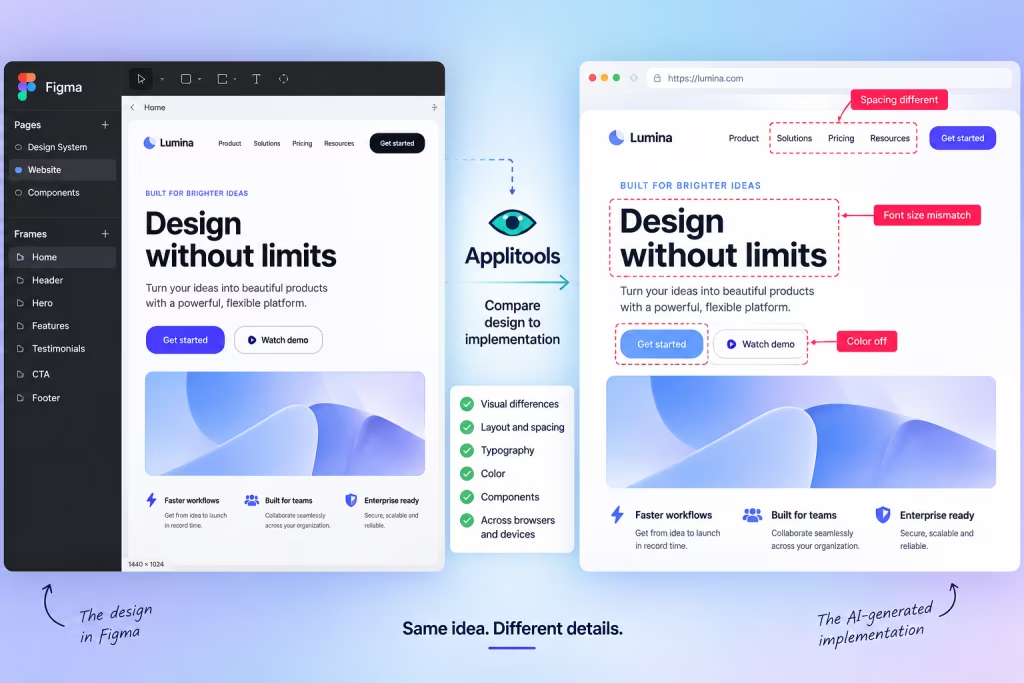
A new release from Applitools tackles exactly that problem by allowing teams to use Figma frames as visual baselinesand automatically compare them against the interface that actually gets built.
Instead of a designer discovering later that the layout has drifted or a component doesn’t match the approved design, those visual differences can now be caught automatically.
And that points to a much bigger problem emerging in AI-assisted web design.
AI is getting faster than the design review
Tools like Claude Code, Cursor, GitHub Copilot and Codex can generate and modify front-end code at impressive speed. But generating an interface quickly doesn’t guarantee that the rendered result matches the approved design.
Code can technically work while still looking wrong.
A button can function perfectly while sitting somewhere the designer never intended. A headline can wrap differently. A card can become too wide. A responsive layout can fall apart at a particular viewport.
None of those problems necessarily mean the code is broken. They mean the implementation has drifted from the design.
That’s why Applitools’ new Figma Design Baselines integration is interesting.
Developers can provide a Figma frame URL and use that design as the visual baseline. Applitools says it automatically matches the test viewport to the design and flags visual drift between what was designed and what ultimately gets implemented.
There’s no Figma plugin required, no manually exporting screenshots and no uploading separate baseline images.
Which potentially means much less time spent with Figma open in one window and the browser in another playing a very depressing game of Spot the Difference.
Figma becomes the referee
This subtly changes Figma’s role in an AI-assisted development workflow.
Traditionally, a Figma design gets handed to a developer who interprets it and builds the interface. Designers and developers then go back and forth fixing discrepancies until everyone is reasonably happy.
With AI-generated interfaces, that process can happen much faster—but the opportunity for visual drift doesn’t disappear.
The new workflow effectively allows the Figma design to become a visual reference that automated testing can check against the live implementation.
Applitools describes the process as mapping live tests directly to Figma design URLs, automatically matching the viewport to the dimensions of the original frame and then applying its Visual AI comparison to the rendered interface.
That matters because the question facing designers may increasingly become less:
“Did the developer follow my design?”
And more:
“Did the AI follow my design?”
And now the AI can investigate what went wrong
The other half of the September 15 release makes this considerably more interesting.
Applitools also expanded its Eyes MCP Server, which connects its visual-testing system with AI coding agents.
Previously, an AI coding agent connected to Eyes MCP could add visual tests from its chat. The new tools allow the agent to inspect, review and resolve those tests as well.
Applitools says the system can provide the agent with pixel-accurate visual difference information alongside DOM context, helping it identify what changed without forcing the developer to jump into a separate testing dashboard.
The agent can also accept, reject or mask visual baselines directly from the chat.
Applitools’ release notes specifically mention Claude Code, Cursor, Copilot and Codex, while its September 15 announcement also lists Cline among supported AI coding workflows.
Put the pieces together and you get the beginnings of a very interesting feedback loop:
Figma design → implementation → visual comparison → detected difference → AI-assisted investigation.
That’s slightly different from simply telling an AI, “Does this screenshot look right?”
Applitools is positioning its Visual AI system as a deterministic visual-validation layer that performs the comparison and then gives the coding agent the resulting visual differences and structural context.
The designer isn’t necessarily removed from that process. If anything, the approved design potentially becomes more important because it establishes the visual target against which the implementation is being checked.
This could solve one of AI coding’s least glamorous problems
AI-generated websites look impressive in demos because demos usually stop at the moment the website appears.
Real products don’t.
Interfaces get changed, components get reused, browsers behave differently, responsive layouts collapse and somebody eventually asks why the checkout button looks weird on an iPhone.
That’s where this release becomes more interesting than another AI coding demo.
Applitools says its platform can perform visual validation across different browsers, devices and operating systems, while the new Figma integration provides a direct reference for what the interface was originally supposed to look like.
That means the question isn’t simply whether the AI successfully generated some working code.
It’s whether the thing users actually see still resembles the thing the designer approved.
“It generated successfully” and “it matches the design” are two very different things.
The design file might become more important, not less
There’s been plenty of speculation about what AI coding tools will eventually mean for traditional design workflows. This development points toward one possible answer.
The Figma file could increasingly become the visual specification that keeps AI-generated interfaces anchored to the original design.
The coding agent builds. The browser renders. Applitools compares. The Figma design provides the reference.
And if workflows like this become normal, designers could spend less time pointing out that the padding is wrong—and considerably more time deciding what the interface should actually be in the first place.
Which, frankly, sounds like a much better use of a designer.







 Estudio EA