



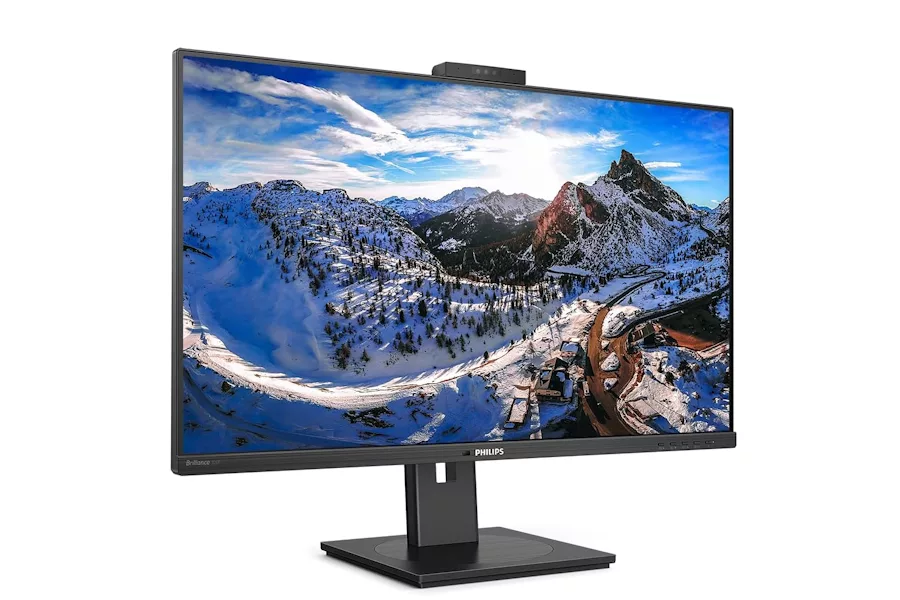

Naturally one of the key things any pro will be looking for when they’re considering which monitor to invest in is the connectivity offered, and once again this is an area well catered for. There are 2x HDMI 2.0, 1x DisplayPort 1.4 in, 1x DisplayPort out, 1x USB-C 3.2 Gen 1 (upstream, power delivery up to 90 W), 1x USB 3.2 Gen 1 (upstream), 4x USB 3.2 (downstream with 1 x Quick Charge BC 1.2) and Ethernet LAN up to 1G.
The monitor in use
I found the 326P1H remarkably easy to set up, and it was connected to my MacBook Pro and up and running in a matter of a couple of minutes. The supplied base and stand clicked together easily, and there are lots of adjustments available, which I really appreciated. The base features a turntable so that the screen can be swivelled if required, while the monitor is also 180 mm height adjustable, moving smoothly up and down, and retaining its chosen position without the need for it to be secured in place.
Adjustments can be made using a series of four function buttons, located on the right side of the bottom bezel, next to the power button. I appreciated the fact that they are so easy to access, rather than being hidden away on the back of the unit or underneath. Some rival monitors come with joystick-style four-way controllers that are arguably more intuitive, but I still found the button system very easy to use and was quite happy with the control they gave me.
In terms of viewing performance IPS displays use advanced technology that gives you extra-wide viewing angles of 178/178 degrees, making it possible to view the screen from almost any angle. The 326P1H also features Philips Flicker-Free technology, to regulate brightness and reduce flicker for more comfortable viewing. Meanwhile there is also a Low Blue Mode setting, which uses smart software technology to reduce harmful shortwave blue light.
In this modern age it’s also important to consider such things as energy costs, and Philips has provided this monitor with a Power Sensor, which transmits and receives harmless infrared signals to determine if the user is present and then automatically reduces monitor brightness should the user step away from the desk, cutting energy costs by up to 80 percent and prolonging monitor life. The panel also uses a smart sensor to adjust the picture brightness depending on the light conditions in the room, again to minimise power usage.






 Estudio EA